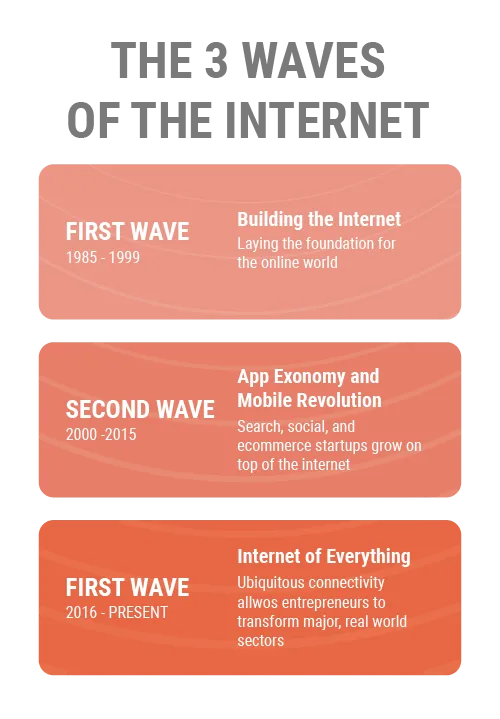
Steve Case describes a third wave of the internet in which connectivity no longer belongs only to technology companies. Many physical and digital products are now defined by their connection to the internet, a shift he calls the Internet of Everything.
Intense competition among physical and digital products has made useful design a commercial requirement. Companies invest in user experience to build around customer needs and reduce expensive rework after release.
For every dollar invested in UX, a business can expect to make a hundred dollars return. According to Forbes
Several reported figures illustrate why teams invest in user experience early:
Think of the developers. It's estimated that they will spend up to 50% of their time on changes and rework. Fixing each glitch after launching the product will cost substantially more than fixing it during the prototyping phase.
Do you want ambassadors for your product? Focus on making your product user-friendly. Almost 90% of customers trust word of mouth more than online reviews. So, a customer-oriented product that makes the user happy will attract more and more customers. Harvard Business Review reported that over 20% of satisfied customers told 10 or more people about the experience.
Consider the revenue advantages. Companies that invested the most in User Experience had a sales increase of 75%, according to this Design Study – not to mention the added impact on customer retention and engagement that also had an impressive increase.
The design thinking process and how to apply it
When you think of design, you may have in mind posters, logos, buttons, and the visually appealing stuff from the interface. However, all these elements are related to the User Interface and are just a part of the Design Thinking process. So how can the complex concept of design thinking be comprehensively defined and why is it used by leading companies like Apple, Google, or Samsung? According to Interaction Design Foundation:
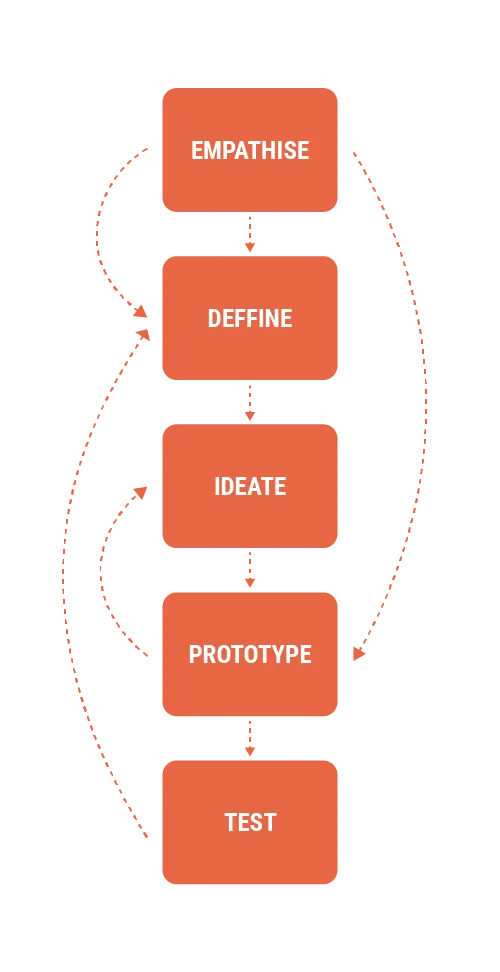
Design thinking is a non-linear, iterative process that teams use to understand users, challenge assumptions, redefine problems and create innovative solutions to prototype and test. Involving five phases — Empathise, Define, Ideate, Prototype, and Test—it is most useful to tackle problems that are ill-defined or unknown.
Design Thinking variants share principles described by Nobel Prize laureate Herbert Simon in The Sciences of the Artificial in 1969. This article uses the five-phase model from Stanford's Hasso Plattner Institute of Design, known as d.school, because it offers a practical structure for applying and teaching the method:
Empathize – with the user and the stakeholder's goals
Define – your users’ needs, their problems, and your insights
Ideate – by challenging assumptions and creating ideas for innovative solutions
Prototype – to start creating solutions
Test – solutions
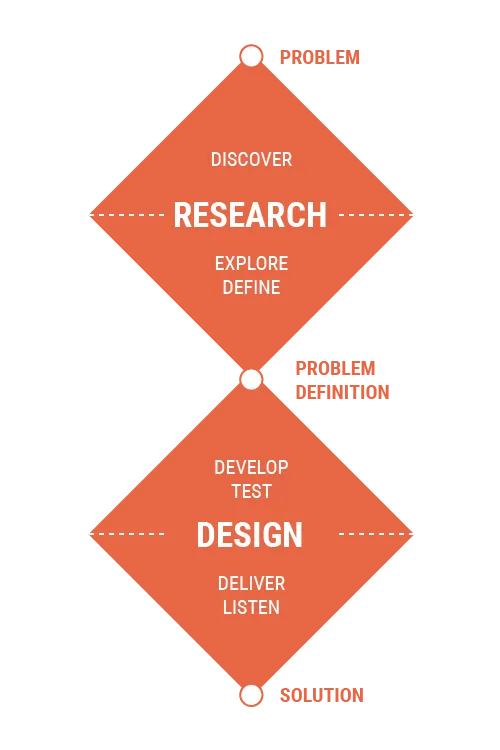
Double Diamond Design Thinking
Developed in 2005 by the British Design Council, the process includes four main stages, inspired by the classing Design Thinking model:
Discover. The first diamond helps people understand, rather than simply assume, what the problem is. It involves speaking to and spending time with people who are affected by the issues.
Define. The insight gathered from the discovery phase can help you define the challenge differently.
Develop. The second diamond encourages people to give different answers to the clearly defined problem, seeking inspiration from elsewhere and co-designing with a range of different people.
Deliver. Delivery involves testing out different solutions at a small scale, rejecting those that will not work, and improving the ones that will.
Applying the methodology
The practical process below explains each deliverable, when to use it, and what it contributes to the product.
Planning and Discovery Methods
The practice of User Experience must begin with a plan and a discovery session. These methods will give focus and guidance for the long-term success of the product. To begin with, we need to ask the following questions:
What do we plan to fix or improve through user experience design?
What is the high-level vision for the resulting experience?
What is the opportunity?
How will UX integrate with the other parts of the product development?
These are the methods we use during the first phase.
The KickOff meeting – Meet with stakeholders to understand their objectives, product vision, requirements, and project constraints.
Use when – a new project is launched
The Lean Canvas model – Lean Canvas is a planning method that helps us get to the heart of our idea. It allows everyone to be on the same page, helping you to set out the key information that you need, without any unnecessary details.
Use when – the team needs a shared view of the project
UX Project Plan – This sits alongside the main Project Plan and defines the UX work required to create the product. Abraham Lincoln captured the principle behind this preparation: “Give me six hours to chop down a tree and I will spend the first four sharpening the ax.”
Use when – a new project is launched
Strategy Worksop – Use the team's combined knowledge to establish an initial product vision and UX strategy. Bring the people involved in the project together and turn their input into a first plan.
Use when – the team needs prioritization / a shared vision needs to be developed / a new project is launched
Research Methods
User-friendly products begin with user research. This exploratory work gives the team direct evidence about people's needs, behavior, and problems.
Learning Plan – Record what the team already knows from internal discussions and stakeholder input. Use the learning plan to separate evidence from assumptions and decide which research methods can close the gaps.
Use when – a new project debuts and knowing more about users is necessary
User Research – UX research methods are ways of generating insights about your users, their behavior, motivations, and needs. Surveys, field research, experiments, and secondary data analysis each answer different questions. Most projects combine methods to build a reliable picture of user behavior.
Use – tor any project
Proto Personas – A proto-persona is a description of the target users/audience of a product based on the assumptions of stakeholders. Creating proto-personas will allow the product teams to begin designing and building immediately, without getting overly bogged down with the details of user behavior
Use when – a clear and specific way of presenting the users is needed
Comparative Assessment – Compare relevant products as well as direct competitors. The comparison gives the team concrete examples when defining the intended experience.
Use when – we need to establish a clear vision of the product
Content Patterns – Content patterns are blueprints made of words. If you have a lot of content items of the same type, designing the content layout in the same way and repeating content elements is a good idea. Content patterns reuse the same word structures, so only unique content, additional to those structures, jumps out at the user.
Use when – we need to set up the structure and the information and the capabilities of the product
User Journey – It refers to a diagram that explores the multiple (sometimes invisible) steps taken by consumers as they engage with a service. This method allows designers to frame consumer’s motivations and needs in each step of the journey, creating design solutions that are appropriate for each.
Use when – we need to visualize the journey process
User Stories – User stories are short, simple descriptions of a feature told from the perspective of the person who desires the new capability, usually a user or a paying customer.
Use when – a clear idea of how the user will interact with the product is needed
Design Methods
Discovery and research feed into the design phase. The methods below help UX designers turn what they learned into concrete flows, structures, and interfaces; the links provide further guidance for each technique.
Design Brief – A design brief is a document accompanying the design project. It is developed in consultation with the client/customer in order to outline the deliverables and scope of the project, including any products or works (function and aesthetics), timing, and budget.
Use when – starting the design phase of the project
Sketches – Our design team will start to sketch the first iterations of the product on paper. The idea is to keep the sketches fast, rough, and dirty. This helps us worry less about design aesthetics and focus more on the rapid formulation of ideas.
Use when – we start to explore design ideas
Task Flows and User Flows – Task flows tend to be linear, showing the high-level steps that a person would take to get to a specific goal or endpoint. Task flows don’t usually branch out with options or decision points, are generally linear and sequential, and are meant to be simple, rather than complex.
User flows, on the other hand, tend to show a specific persona’s pathway through the design at hand**. A set or series of task flows can be embedded within user flows. However, unlike task flows, user flows include decision points wherein the persona’s journey to the desired goal can differ, based on decisions the persona needs to make in interacting with the design**. User flows also tend to have multiple types of elements, such as key pages (for websites) or key screens (for apps), user actions, user decision points, and system decisions. User flows are also generally more complex than task flows, with multiple ways to begin/enter and end/exit the flow.
Use when – we need a complete picture of how the broader UX hangs
Wireframes – Wireframing is a process that involves overviews of interactive products drawn by designers, in order to establish the structure and flow of possible design solutions. These outlines reflect user and business needs. Paper or software-rendered wireframes help teams and stakeholders ideate toward optimal, user-focused prototypes and products.
Use when – we are ready to explore the details of the product
Testing and Validation Methods
Low Fidelity Prototypes – Low-fidelity (lo-fi) prototyping is a quick and easy way to translate high-level design concepts into tangible and testable artifacts. The first and most important role of lo-fi prototypes is to check and test functionality rather than the visual appearance of the product.
Use when – validating the UX interaction
Style Guide – A style manual, or style guide, is a set of standards for the design of documents, website pages, signage, and any other form of brand identifier. The reason for their existence is to ensure complete uniformity in style and formatting wherever the brand is used.
Use when – we need to discover the visual part of the app
Mockups – A mockup is a static design of a web page or application that features many of its final design elements but is not functional. A mockup is not as polished as a live page and typically includes some placeholder data.
Use when – we present the first design iterations of the product
Five-Second Test – Five-second testing is a user research method that helps us gauge users' first impressions of a design. In a five-second test, participants are shown an image of a landing page or screen for five seconds and then asked a follow-up question about what they saw.
Usability Testing – Usability Testing, also known as User Experience (UX) Testing, is a testing method for measuring how easy and user-friendly a software application is. We test our products with a small set of target end-users, using a software application to expose usability defects. Usability testing mainly focuses on the ease of using the application, flexibility of the application to handle controls, and ability of the application to meet its objectives.
Conclusion
Our product process starts with the people who will use the result. Design Thinking gives the team a practical way to understand their needs, context, and reactions.
Testing leads into implementation. Developers are involved from the beginning, so the technical constraints and design decisions are understood before the build starts.
Finally, before the launch, another testing session with users will be needed to make certain that the product is ready to be released. This process will start anew when updates and other features will be required, from discovery and ending with testing again.